
I have been using a Garmin Fenix running / outdoors watch for a number of years. This post isn’t going to be a ‘which is better’ kind of post, both watches are superb at what they do but different at the same time.
The aim of the post is to explore my own preconceptions of the Apple Watch and to ascertain if it can better meet my smartwatch / running / outdoor needs over my Fenix 6. I will update the post every few days and at Day 1 my gut feeling is that I will be back with my Fenix 6 Pro before the end of the 30 days, my fear is battery life. Time will tell…
Day 1
I decided to wipe all my previous Apple Health data and start the entire health experience from scratch. The Garmin scales will measure the obvious metrics and the Apple watch will do everything else for the next 30 days.
9am on day 1 and I was already fretting about battery life to the point I was turning off some app notifications. I had gone though the set up process the night before and marvelled at the quality of the screen. So here goes.
11am more app notifications were deactivated this time it wasn’t to do with battery life but annoyance. It’s nice to be able to control exactly what apps can get my attention and which can be ignored. The Apple Watch sound was also turned off.
10.30pm I decided I was going to use the Apple Watch for sleep tracking. I have ready plenty of reviews covering how basic it is but I wanted sleep SPO2.
Day 2
6.00am I decided I wasn’t going to start checking battery life every few hours as I knew if I started it would be obsession. I decided to do my first Apple Fitness activity, a 30-minute treadmill run. From a fitness point of view, it was useful to have all the metrics on screen but at 6am in the morning the instructor’s enthusiasm was a bit much. I don’t really enjoy the interaction.
The instructor started to ask me questions and even though I didn’t reply she reacted as if I had. When I told her “I didn’t say anything” she ignored me :). I realised this buzz and enthusiasm would be something I’d have to get over if I was to engage further with Apple Fitness. Please note this isn’t a criticism of the instructor or of Apple Fitness, the Northern Ireland personality is reserved and self conscious.
7.10am the watch was on charge, by 8am I had received an alert on my phone that the watch was fully charged. I was genuinely surprised although I think my fear of battery life meant I kept interactions minimal, and my run didn’t need GPS data.
Day 3
Today was a write off following my second covid vaccination.
Day 4 : The day of the Apps
A slow recovery from the vaccination I was beginning to realise I was missing some of the metrics my Garmin offered. Today I reinstalled Zones and Healthfit following previous explorations a few years ago. Both apps had seen updates and I marvelled at how they presented the from my single activity.
A new app to me was Heart Analyzer, the app was an eyeopener both in terms of its function but also in terms of just how much data the Apple Watch was collecting. The Apple Watch’s simplicity doesn’t mean it’s basic in function. I ran a little ECG test so Heart Analyzer would have more data. I am looking forward to seeing how this data grows over time.
11pm and the last app I discovered was one to replace my love of Garmin’s Body Battery metric. A few years ago, I bought a Whoop band but to be honest it offered far more information than I really needed (or understood). The Training Today is a free app (although I recommend the full version upgrade (a massive £2.99)) uses HRV to suggest how you should approach training on a given day.
The app recommends 60 days of data to improve accuracy but’s great right out of the box. The graphs are fantastic, and it visually presented the struggle with the second covid vaccination.
Day 5
This was going to be the first make or break days. I was going to do 24 hours without a charge and two reasonably long activities. Getting up early I put my watch on charge, it reached 95% before I left home for the mountains.
During the day I did two activities, a 90-minute forest walk and a two-hour mountain hike. I took two calls on the watch (felt like an idiot doing so but my phone was in my bag). I didn’t check the battery at all throughout the day until I arrived home at about 6pm.
I expected the watch to read 10-20% to my surprise it was at 48%. I carried on and tracked sleep putting the watch on to charge the next morning.
Day 6
I woke up and headed for coffee while putting the watch on to charge. An hour or so later I was on a full battery. Compared to my Fenix 6 Pro that is still poor but compared to my expectations I am genuinely surprised. I checked through my apps to look at my activities from a range of different viewpoints. It was interesting to see that the Apple Watch had given me a VO2 max approximation of 42 following the hike. The Garmin has me at 47 but given I haven’t run outside with the Apple Watch I can’t expect much in the way of accuracy this early.
I really love the Healthfit app. I originally bought it to integrate with Strava but It’s become its own haven of data interpretation. I can view my activities by explorer score (I love this) which covers the number of maps tiles you cover. It offers heatmaps, activity analysis, analysis by photo. HealthFit also allows you to export your activities as sharable images.
Day 7
Today I have discovered the brilliant WorkOutDoors app for planned training runs. The app is remarkably powerful yet easy to use. The app is a little like the Garmin workouts option and you can set target pace, distance, time etc. I am looking forward to seeing how this works in practice.
I did my second, albeit short Apple Fitness + workout. I still love seeing all the metrics on the screen and I am surprised how tough the ten minute work out was. This service is definitely impressive. I am going to try and explore the programmes, although at the moment I only see three options, and the pregnancy programme won’t be for me.
An afternoon walk brought a change to VO2 max which is quite significant. My Garmin has estimated my VO2 max was 47, yesterday’s hike offered of a VO2 Max of 42 but today’s walk dropped it to 37. I am not sure what to think about this, a) it’s early days, b) I haven’t run with the Apple Watch outside as yet and c) it seems odd that it would allow just a large change following a casual family walk. Perhaps this area needs more time.
Day 8
I got up at 6am, yesterday was quiet with only a one hour walk with GPS so I was happy to find the watch had 56% charge. I headed out for a 5km run, charged the watch while in the shower and it was back up to 80% in a short space of time. That said, my Garmin is still sitting beside the charger with life on the screen. I think charging is going to become a routine that I build into the down times.
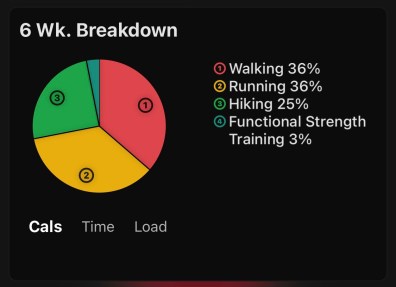
VO2 max increased to 41, that’s still off Garmin’s estimation of 47 (based on a year’s worth of data. Either Apple Health needs a little more time to establish a reliable reading or Garmin’s prediction that I am in the top 20% for age is wrong. I do fear 47 might be an over prediction to be honest, time will tell.
I added two new apps to my set up. Heart Watch 4 is another app that interrogates your health data and activities and gives a range of different perspectives.
It’s a nice interface and I see myself using the different heart data apps over the next few weeks before finalising on those that meet my needs.
The second app is FITIV which appears to be a community approach to fitness, the app allows you to analysis your data, but it also offers a workout builder. FITIV points are awarded based on performance. It looks great although some features are a subscription service. I think I need to stop looking at the different apps and focus on the basics.
The Apple Fitness+ app is encouraging me to mark World Yoga Day with a 20-minute activity. I can see how this could be a real motivator for down days. I put this off, and off but decided to give it ago. It was a massive achievement as I created a source of entertainment for my kids. I am slowly getting used to the Apple Fitness Platform, a structured programme would definitely be advantageous.
My three focus apps remain, Healthfit, Heart Analyzer and Zones.
To be Continued…
Next week will be a focus on running with the Apple Watch. If you have any advice or recommend apps please add them to the comments below.




Worth checking out
I love that you are doing this and I will be following, I have not been able to totally give up my Polar Vantage for running and cycling but there is one Apple Watch app that gives you lots of metrics and could come close to the Fenix 6 for data. The app is called Workoutdoors, I have it, I really like it, it was on the expensive side for an app but it is not subscription based. Check it out, many reviews on YouTube as well.
Nick. I actually bought it yesterday and have set up my first workout. It looks great and I am hoping it replaces Garmin work outs. I’m struggling with VO2 max though. Perhaps Garmin’s 47 was overly generous as after a walk Apple has demoted me from 42 to 37 ????